In the digital age, almost every day we connect to the Internet – from browsing the web, watching YouTube, and using social media to sending emails or making intercontinental video calls. But have you ever wondered how a laptop at home can communicate with a server located in the United States, or how the phone in your pocket can send a message all the way to Europe?
The answer lies in a concept that may seem simple but is extremely important: the IP address. If we think of the Internet as a gigantic city, then an IP address is like a house number – an electronic identity that allows devices to find each other. Without IP addresses, the Internet would be nothing more than a tangle of cables and meaningless signals.
In this article, I will explore the IP address with you in detail: what it is, how it works, how many types there are, why IPv4 and IPv6 exist, and why understanding IP is important not only for IT professionals but for anyone who uses the Internet on a daily basis.
1. Overview of IP Addresses
1.1. What Is an IP Address?
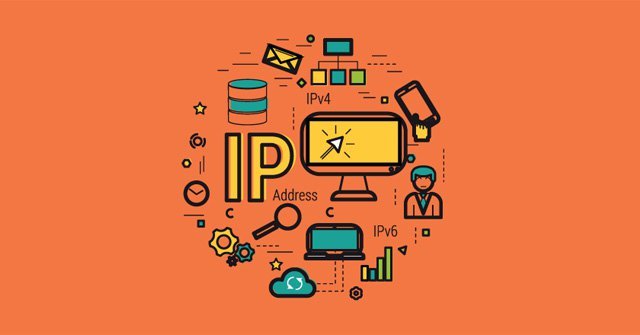
An IP address (Internet Protocol Address) is a sequence of numbers assigned to each device in a computer network. It serves as an identifier, enabling devices to “recognize” one another and exchange data accurately.
You can imagine the Internet as a gigantic city, and each device (computer, phone, server, camera, etc.) as a house. Without an address, the mail carrier (data packets) would not know where to deliver the mail. An IP address is the “home address” in the digital world.
A data packet traveling on the Internet always contains a source IP (the address from which it is sent) and a destination IP (the address of the recipient). Thanks to this, information can travel around the world and still return to the correct computer.
Example:
When you type www.google.com, the DNS translates this domain name into an IP address, for example 192.168.190.14. Thanks to this, the browser can establish a connection with Google’s server.
1.2. The Role of IP in Computer Networks
An IP address has two extremely important roles:
- Device identification: Like an identity card, an IP address is unique within a network. Without an IP address, it would be impossible to determine which device is “machine A” or “machine B.”
- Data routing: Imagine sending a parcel from Hanoi to New York. Along the way, it passes through many checkpoints (routers). The IP address acts as a “road map,” allowing the data packet to know which direction to take at each next step.
- Global communication: Thanks to IP addresses, a computer in Vietnam can send emails to the United States, or a smartphone can make video calls to Japan.
Without IP addresses, the Internet would be nothing more than a tangle of cables and “silent” computers, with no way for devices to recognize one another.
1.3. Classification of IP Addresses
In practice, IP addresses are classified in several ways. Some common classifications include:
a) By scope of use
- Private IP (internal IP):
Used within a LAN (local network). Examples include 192.168.x.x and 10.x.x.x.
→ These addresses are used for devices within a home or company network to communicate with each other and do not connect directly to the Internet. - Public IP:
Assigned by an Internet Service Provider (ISP). This is the address that is “visible” on the Internet.
→ For example, when you search on Google for “what is my IP,” the address you see is your Public IP.
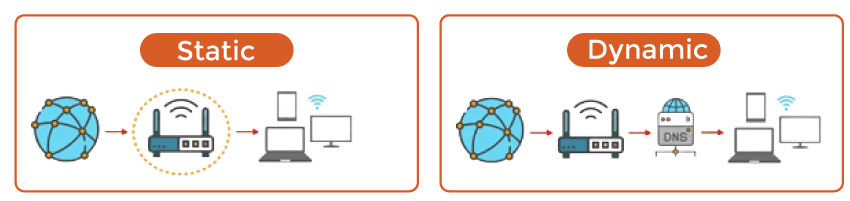
b) By stability
- Static IP: An address that does not change over time. It is commonly used for web servers and email servers.
- Dynamic IP: An address that changes each time you connect to the Internet. Regular users are typically assigned this type of IP to conserve the number of available addresses.
c) IPv4 vs IPv6
- IPv4: Introduced earlier, with a length of 32 bits, providing a maximum of about 4.3 billion addresses.
- IPv6: Introduced later, with a length of 128 bits, offering an almost unlimited number of addresses.
Easy-to-Understand Real-World Example
Assume your home has Wi-Fi. The router assigns each device a Private IP (for example: Laptop – 192.168.1.2, Smartphone – 192.168.1.3). However, when accessing the Internet, both devices are “hidden” behind a single Public IP assigned by the ISP (for example: 203.113.45.67).
The router acts like a “gatekeeper,” translating and forwarding data between Private IP addresses and the Public IP address. This mechanism is called NAT (Network Address Translation). Thanks to NAT, despite the limitations of IPv4, we are still able to connect millions of devices to the Internet.
2. Structure of an IP Address
2.1. Structure of an IPv4 Address
a) Representation format
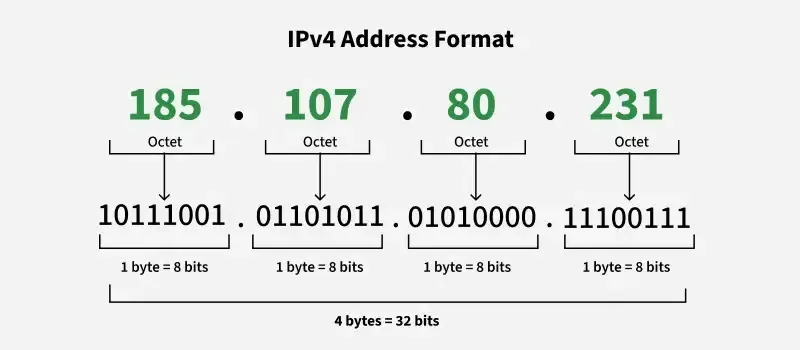
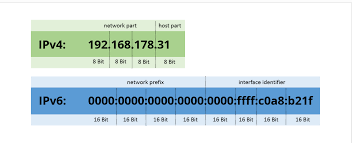
IPv4 consists of 32 bits (that is, 4 bytes). To make it easier for humans to read, it is divided into four groups (called octets), each octet being 8 bits, and then written in decimal numbers separated by dots.
Example:
- Binary: 11000000 10101000 00000001 00001010
- Decimal: 192.168.1.10
Each octet has a value from 0 to 255, so IPv4 ranges from 0.0.0.0 to 255.255.255.255.
b) Division into Network ID and Host ID
An IPv4 address consists of two parts:
- Network ID: Identifies the network.
- Host ID: Identifies the device (host) within that network.
Example:
- Address: 192.168.1.10
- Subnet Mask: 255.255.255.0
→ The first three octets (192.168.1) are the Network ID, and the last octet (10) is the Host ID.
Thus, all IP addresses 192.168.1.x (where x ranges from 1 to 254) belong to the same network.
c) Special Addresses in IPv4
- Network address: Host ID = 0 (for example, 192.168.1.0).
- Broadcast address: Host ID = all bits set to 1 (for example, 192.168.1.255).
- Loopback address: 127.0.0.1 – used for a computer to communicate with itself.
d) Subnet Mask and CIDR
To distinguish between the network part and the host part, a Subnet Mask is used.
For example:
- Subnet Mask:
255.255.255.0 - CIDR notation: /24 (meaning the first 24 bits are for the network, and the remaining 8 bits are for the host).
CIDR (Classless Inter-Domain Routing) allows for more flexible network subdivision compared to the traditional class-based addressing of Classes A, B, and C.
2.2. Structure of an IPv6 Address
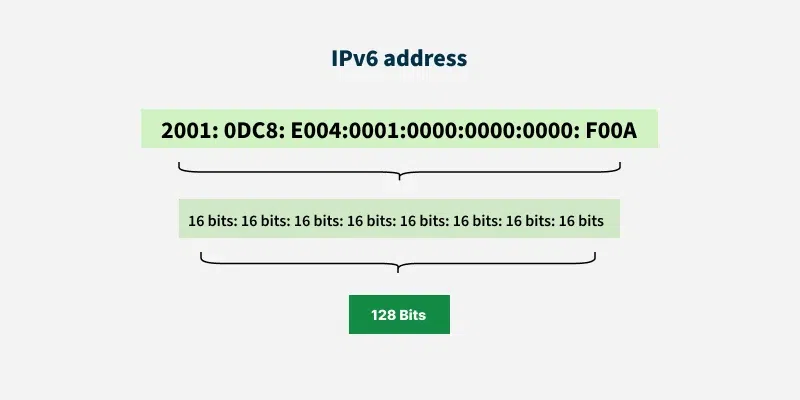
IPv6 is 128 bits long, divided into 8 groups, with each group consisting of 16 bits. It is represented in hexadecimal (base 16) to make it more compact, with groups separated by colons (“:”).
Example:
2001:0db8:85a3:0000:0000:8a2e:0370:7334
a) IPv6 Address Shortening
IPv6 addresses are usually very long, so there are several rules for shortening them:
- Remove leading zeros in each group:
0370 → 370 - Replace consecutive groups of zeros with :: (used only once in an address):
2001:0db8:0000:0000:0000:0000:0000:7334 → 2001:db8::7334
b) Classification of IPv6 Addresses
- Unicast: A unique address assigned to a single device (similar to IPv4).
- Multicast: A packet is sent to multiple devices simultaneously.
- Anycast: A packet is delivered to the “nearest device” within a group.
c) Network Prefix
In IPv6, there is also the concept of network/host, but it is referred to as the prefix length.
For example:
- 2001:db8::/64 → The first 64 bits represent the network, and the remaining 64 bits represent the host.
- An IPv6 /64 network can contain 2⁶⁴ hosts, meaning billions of devices.
2.3. Comparison of IPv4 and IPv6 Address Structures
| Criteria | IPv4 (32 bit) | IPv6 (128 bit) |
|---|---|---|
| Representation format | Decimal (dot notation) | Hexadecimal (colon notation) |
| Total number of addresses | 4.3 billion | Nearly unlimited |
| Address allocation / Division | Network + Host | Prefix + Interface ID |
| Subnet | Subnet Mask | Prefix length |
| Address types | Unicast, Broadcast, Multicast | Unicast, Multicast, Anycast |
| Complexity | Short, easy to remember | Long, difficult to remember (but can be shortened) |
3. Applications and Practical Uses of IP Addresses
IP addresses are not merely a theoretical concept; they are closely tied to many real-world applications in everyday life, as well as in enterprises and specialized fields. This can be clearly observed through several contexts, as outlined below:
3.1. In the home environment
In most households today, the use of IP addresses happens quietly behind the scenes of network devices. The home router typically acts as a distributor of Private IP addresses for devices on the local network such as laptops, smartphones, and smart TVs. These IPs usually take the form 192.168.x.x or 10.x.x.x.
When a device needs to access the Internet, the router uses NAT (Network Address Translation) to convert the Private IP into a single Public IP assigned by the Internet Service Provider (ISP). This helps to:
- Conserve IPv4 address space.
- Improve security, as internal devices are not directly exposed to the Internet.
- Simplify management when many devices are connected at home.
Example: When I watch YouTube on my phone, the device is actually “hidden” behind a single Public IP that the entire household shares.
3.2. In enterprises
In business environments, IP addresses play a much more critical role. Some specific applications include:
- Server management: Each server typically has a fixed (static) IP so that customers or employees can access it reliably.
- Internal services: Applications such as ERP, CRM, or internal email systems need to run on stable IP addresses to ensure continuous connectivity.
- Surveillance systems: Security cameras are often associated with specific IPs, allowing remote monitoring over the network.
- VLAN segmentation and subnet management: IP addressing is used to divide networks by departments, reduce conflicts, and enhance security.
In practice, the larger the enterprise, the more complex the design and management of the IP addressing system becomes, requiring careful planning by network engineers.
3.3. In security
IP addresses are also a key component in network security:
- Firewalls: Allow or block connections based on IP addresses. For example, an entire IP range from a country may be blocked if attacks frequently originate from there.
- VPN (Virtual Private Network): When connecting through a VPN, users are assigned a different IP address, helping with anonymity, bypassing geographic restrictions, or improving security on public Wi-Fi networks.
- Information leak detection: Security services can analyze IP logs to detect abnormal behavior (for example, multiple failed login attempts from an unfamiliar IP).
Thanks to these mechanisms, IP addresses serve both as tools for protecting systems and as crucial clues in investigating cyberattacks.
3.4. In SEO & Marketing
IP addresses also have a certain impact in SEO and Marketing:
- Geographic location: Google and other search engines use the server’s IP to determine a website’s location. If the server is located in Vietnam, domestic users will load the site faster, improving user experience.
- Speed and reliability: IPs are tied to server quality. An IP associated with low-quality hosting can slow down a website, leading to lower SEO rankings.
- Avoiding blacklists: If many spam websites share the same IP, that IP may be blacklisted, negatively affecting email marketing or SEO.
- Campaign management: In digital marketing, IP tracking helps analyze user behavior, identify target markets, and prevent fraudulent clicks in PPC advertising.
4. Challenges and Future Trends
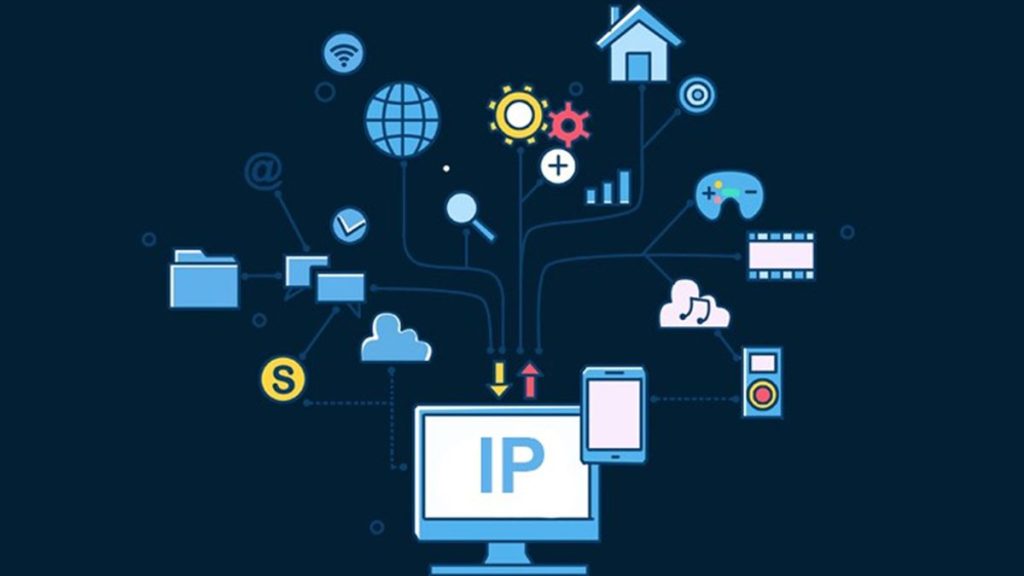
As the Internet continues to grow, IP addresses face numerous challenges while also giving rise to inevitable future trends.
4.1. IPv4 Exhaustion
IPv4 was designed with approximately 4.3 billion addresses. While this number may seem large, in reality it is insufficient to meet global demand:
- Explosion of connected devices: From computers, smartphones, and smart TVs to refrigerators, cameras, and cars—all require IP addresses to operate.
- Uneven allocation: Some regions and organizations were allocated more IP addresses than they actually need, while others face shortages.
- Rising costs: A market for buying and selling IPv4 addresses has emerged, and the price of a single IPv4 address is steadily increasing, putting pressure on small businesses and service providers.
As a result, IPv4 is gradually becoming a “scarce resource” that is difficult to sustain in the long term.
4.2. Transition to IPv6
IPv6 was introduced to comprehensively solve the address shortage problem, with an almost unlimited address space (2¹²⁸ addresses). However, the transition process is far from simple:
- Infrastructure costs: Enterprises need to upgrade routers, switches, servers, and software to support IPv6.
- Deployment time: Many legacy systems only support IPv4, forcing organizations to run IPv4 and IPv6 in parallel (dual-stack), which increases complexity.
- Global coordination: The Internet is a global network, so the transition must be coordinated across organizations, countries, and service providers.
Despite these challenges, the move toward IPv6 is inevitable and is being strongly promoted worldwide.
4.3. IP-Related Security Issues
IP addresses also bring several security challenges, including:
- IP spoofing: Attackers forge IP addresses to bypass systems, making tracing more difficult.
- DDoS attacks: Hackers use large numbers of IP addresses to flood servers with requests, disrupting services.
- Tracking and privacy invasion: IP addresses can reveal geographic location and browsing behavior, which may be exploited for malicious purposes.
In this context, strengthening cybersecurity solutions such as next-generation firewalls, IDS/IPS systems, and anonymity technologies (VPN, TOR) is essential.ế hệ mới, hệ thống IDS/IPS, và công nghệ ẩn danh (VPN, TOR) là vô cùng cần thiết.
4.4. Internet of Things (IoT)
The rapid growth of IoT is the clearest evidence of the inevitable need for IPv6:
- Billions of sensors, smart home devices, and Internet-connected vehicles all require unique addresses to communicate.
- IPv4 is entirely insufficient to meet this demand, whereas IPv6 can easily provide addresses for every device.
Assigning an IP address to each “thing” opens the door to a new era – a fully connected world where every device can exchange data directly.
5. Conclusion
Through this article, I have analyzed IP addresses in detail—from their concept, structure, and classification to real-world applications and future development trends. It is clear that IP addresses are not merely an “identification card” on the Internet, but a fundamental foundation that enables all digital connections to function smoothly.
In everyday life, IP addresses allow household devices to access the Internet; in enterprises, they support the operation of servers and internal services; in security, they serve both as a control mechanism and a challenge to address. In addition, within SEO and marketing, IP addresses play an important role in website speed, reliability, and reach.
However, with the exhaustion of IPv4, the transition to IPv6 is an inevitable trend. Despite challenges related to infrastructure, cost, and security, IPv6 offers an almost unlimited address space and serves as a critical stepping stone for supporting billions of IoT devices in the future.
In summary, IP addresses are not just basic knowledge—anyone working with computer networks, programming, or system administration needs to understand them thoroughly. A clear understanding of IP will help both me and you use the Internet more effectively, build more secure systems, and be better prepared for the technological changes ahead.
6. References
[1] B. A. Forouzan, Data Communications and Networking, 5th ed. New York, NY, USA: McGraw-Hill Education, 2017.
[2] J. F. Kurose and K. W. Ross, Computer Networking: A Top-Down Approach, 8th ed. Boston, MA, USA: Pearson, 2021.
[3] Internet Assigned Numbers Authority, “IP Addressing,” IANA. [Online]. Available: https://www.iana.org/numbers. [Accessed: Oct. 4, 2025].
[4] S. Deering and R. Hinden, “Internet Protocol, Version 6 (IPv6) Specification,” RFC 2460, IETF, Dec. 1998. [Online]. Available: https://www.rfc-editor.org/rfc/rfc2460. [Accessed: Oct. 4, 2025].
[5] Internet Society, “IPv6 Deployment,” Internet Society. [Online]. Available: https://www.internetsociety.org/deploy360/ipv6/. [Accessed: Oct. 4, 2025].
[6] World IPv6 Launch, “World IPv6 Launch Day,” World IPv6 Launch. [Online]. Available: https://www.worldipv6launch.org/. [Accessed: Oct. 4, 2025].