In programming, loops are one of the most fundamental and important concepts. Thanks to loops, we can repeatedly execute a block of code without having to write it manually multiple times. Imagine you want to print numbers from 1 to 100. Without loops, you would have to write 100 lines of print() statements. But with loops, only a few lines of code are needed.
Python provides two main types of loops: for and while. While for is typically used when the number of iterations is known in advance, while excels in situations where the number of iterations is not predetermined and depends on a condition.
In this article, we will explore the while loop in Python: its syntax, how it works, practical applications, accompanying control statements, common mistakes, and a comparison with the for loop.
1. Concept of the while Loop
The while loop in Python allows a block of code to be executed repeatedly as long as the condition remains true (True). When the condition becomes false (False), the loop stops.
Basic syntax:
while điều_kiện:
# khối lệnh được lặpSimple example: print numbers from 1 to 5.
i = 1
while i <= 5:
    print(i)
i += 1Here, the variable i acts as the stopping condition. If i is not incremented in each iteration, the program will run indefinitely.
2. Execution Flow of the while Loop
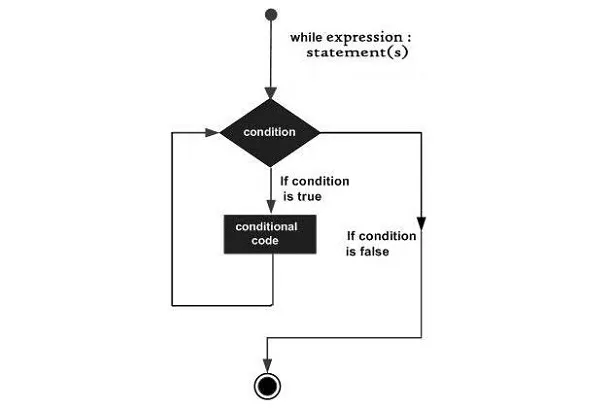
The working mechanism of the while loop in Python can be summarized as follows:
- Check the condition.
- If the condition is true (
True) → execute the code block. - Return to step 1.
- If the condition is false (
False) → exit the loop.
Illustrative example:
x = 3
while x > 0:
    print("Countdown:", x)
    x -= 1
print("Time's up!")At the final step, when x decreases to 0, the condition x > 0 becomes False, and the loop stops.
3. Control Statements Used with the Loop
Python provides several statements to control the while loop.
🔹 break – immediately exits the loop
i = 1
while i <= 10:
    if i == 5:
        break
    print(i)
    i += 1

#results
1 2 3 4🔹 continue – skips the current iteration
i = 0
while i < 5:
    i += 1
    if i == 3:
        continue
    print(i)

#results
1 2 4 5🔹 else in the while loop
Python has a distinctive feature: loops can be accompanied by an else clause. The else block executes when the loop finishes naturally, without being interrupted by a break.
i = 1
while i < 4:
    print(i)
    i += 1
else:
    print("End...!!!")


#result
1 2 3 End...!!!
4. Comparing while and for in Python
for: suitable when the number of iterations is known in advance.while: suitable when only the stopping condition is known and the number of iterations is not predetermined.
Example: print numbers from 1 to 10:
# for
for i in range(1, 11):
    print(i)

# while
i = 1
while i <= 10:
    print(i)
    i += 1
Advice:
- Choose
forwhen iterating over sequences such as ranges or lists. - Choose
whilewhen working with dynamic conditions.
5. Conclusion
The while loop in Python is a powerful tool that helps handle situations where the number of iterations is not predetermined. Mastering how to use while, along with break, continue, and else, will enable you to write more flexible and efficient programs.
However, always be cautious of infinite loops. Make sure that the loop condition will change and eventually become False.
Advice: practice with small examples, then apply them to real-world problems such as handling user input, building simple games, or creating program menus.
6. References
- Python Official Documentation: https://docs.python.org/3/tutorial/controlflow.html#while-statements
- W3Schools: https://www.w3schools.com/python/python_while_loops.asp
- Real Python: https://realpython.com/python-while-loop/
- Python for Professionals: Learning Python as a Second Language: https://www.kobo.com/us/en/ebook/python-for-professionals-3
- Python: Deeper Insights into Machine Learning: https://www.kobo.com/us/en/ebook/python-deeper-insights-into-machine-learning
- DataFusion Python Bindings in Practice: The Complete Guide for Developers and Engineers: https://www.kobo.com/us/en/ebook/datafusion-python-bindings-in-practice