In any discussion about computer networking, the IP address inevitably appears as a foundational concept – it is the means by which devices “identify” one another and “send mail” across a network. At its most fundamental level, IPv4 is the version of the IP protocol that laid the groundwork for the Internet as we know it today.
In this article, you and I will explore IPv4 in a detailed and practical manner: its core concepts, address structure, classification, how it operates during packet transmission, its real-world limitations, and even how it is applied in programming. The objective is to equip you with a solid, systematic body of knowledge – sufficient to read network configurations, debug connectivity issues, or deploy simple networked applications with confidence.
1. Concept of IPv4
IPv4 (Internet Protocol version 4) is the fourth version of the Internet Protocol, used to identify devices and transmit data across computer networks. It operates at the Network Layer of the OSI model and forms the fundamental basis that enables devices to “communicate” with one another over the Internet.
IPv4 uses 32-bit addresses, allowing for the creation of slightly over 4 billion unique addresses. Every network-connected device—from computers and smartphones to routers – must have a unique IPv4 address in order to send and receive data.
IPv4 serves three primary roles:
- Identification: Each device on the network is assigned a distinct IP address, enabling it to be uniquely identified and to communicate with other devices.
- Routing: Routers use the destination IP address contained in each packet to determine the optimal path, ensuring that data reaches the correct destination.
- Packetization and fragmentation: IPv4 divides data into smaller packets to facilitate transmission across the network, then reassembles them at the destination.
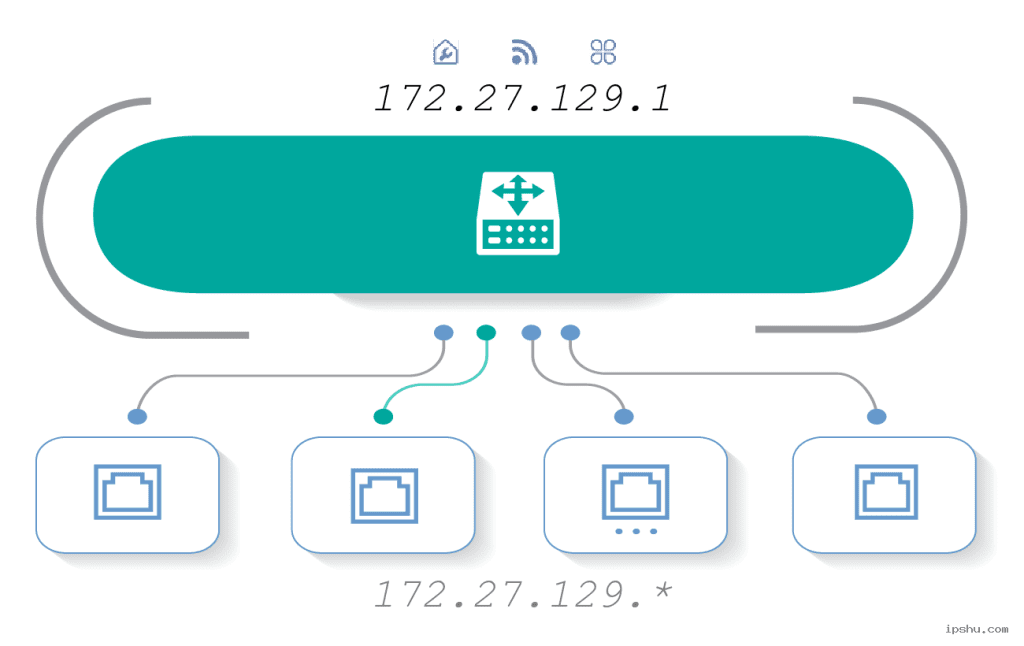
Practical example: In a home network, a router typically assigns addresses such as 192.168.1.x to connected devices. These are private IPv4 addresses, valid only within the local network, allowing devices like laptops, smartphones, and smart TVs to communicate with one another without directly accessing the public Internet.

2. IPv4 Address Structure
An IPv4 address is 32 bits long, divided into four groups (octets), each consisting of 8 bits. In practice, IPv4 addresses are written in dotted-decimal notation, meaning four decimal numbers separated by dots, for example: 192.168.1.10.
Each octet can have a value from 0 to 255 (corresponding to (2^8 – 1)). When converted to binary form, the internal structure of the address becomes clearer:
- 192 → 11000000
- 168 → 10101000
- 1 → 00000001
- 10 → 00001010
Combined, the binary representation of 192.168.1.10 is: 11000000 10101000 00000001 00001010
Subnet Mask and CIDR
An IPv4 address is logically divided into two parts:
- Network portion: identifies the network to which the device belongs
- Host portion: identifies a specific device within that network
A subnet mask is used to distinguish between these two parts. For example, the subnet mask 255.255.255.0 (equivalent to /24 in CIDR notation) indicates that the first 24 bits represent the network portion, while the remaining 8 bits are used for host addresses.
The number of usable host addresses in a subnet is calculated as: 2^(32 – prefix) – 2
(The subtraction accounts for the network address and the broadcast address.) For example, with a /24 network: 2^8 - 2 = 254 usable addresses are available for devices.
In real-world network configuration, the CIDR notation is commonly used, such as 192.168.1.0/24. This representation is concise, unambiguous, and widely adopted across modern networking systems.
3. Classification of IPv4 Addresses
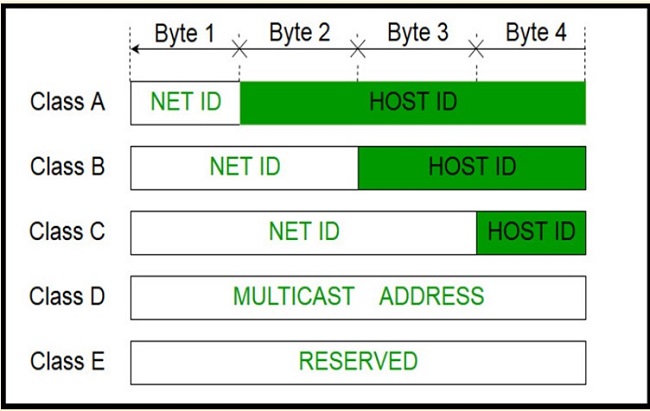
In the early days of the Internet, IPv4 addresses were divided into classes (known as classful addressing). Although CIDR has largely replaced this approach, understanding address classes remains important for building a solid conceptual foundation of how IPv4 works.
The basic IPv4 address classes are:
- Class A
Range:1.0.0.0to126.255.255.255
Designed for very large networks, with a default prefix of/8(8 bits for the network, 24 bits for hosts).
Note:127.0.0.0/8is reserved for loopback purposes (e.g.,127.0.0.1) and is used for local testing on the host itself. - Class B
Range:128.0.0.0to191.255.255.255
Intended for medium-sized networks, with a default prefix of/16. - Class C
Range:192.0.0.0to223.255.255.255
Designed for small networks, with a default prefix of/24. This class is commonly encountered in home networks and small businesses. - Class D
Range:224.0.0.0to239.255.255.255
Used for multicast, enabling data to be sent to multiple devices simultaneously (e.g., streaming and IPTV). - Class E
Range:240.0.0.0to255.255.255.255
Reserved for experimental purposes and not used in standard networking environments.
Special IPv4 Addresses to Remember
Several IPv4 address types are considered special and are important to recognize in practice:
- Loopback (
127.0.0.0/8)
Allows a computer to send data to itself. This range is commonly used for testing servers or networked applications locally (e.g.,127.0.0.1). - Private addresses (RFC 1918)
Reserved for internal networks and not routable on the public Internet:10.0.0.0/8172.16.0.0/12(from172.16.0.0to172.31.255.255)192.168.0.0/16
- Broadcast address
An address in which all host bits are set to 1, for example192.168.1.255in a/24network. It is used to send packets to all devices within the same subnet.
In practice, having a solid understanding of private and loopback addresses is sufficient for configuring and managing most basic networking systems.
4. How IPv4 Operates in Network Communication
IPv4 operates at Layer 3 (the Network Layer) of the OSI model, where it is responsible for identification, routing, and data delivery across different networks. When an application sends data, the Transport Layer (TCP or UDP) first divides the data into segments. IPv4 then encapsulates these segments into packets for forwarding.
Each intermediate router examines the destination IP address in the IPv4 packet header to determine the most efficient path toward the target network. This process, known as routing, is a core mechanism that enables the Internet to function as a globally interconnected system.
Structure of the IPv4 Header (Key Fields)
- Version (4 bits)
Indicates the protocol version; always set to 4 for IPv4. - IHL – Internet Header Length (4 bits)
Specifies the length of the header, allowing the receiver to determine where the payload begins. - Type of Service / DSCP
Defines packet priority or Quality of Service (QoS) parameters. - Total Length
The total size of the packet, including both header and payload. - Identification, Flags, Fragment Offset
Used for packet fragmentation and reassembly when a packet exceeds the MTU (Maximum Transmission Unit) of a link. - TTL (Time To Live)
A countdown value that is decremented by 1 at each router hop. When TTL reaches 0, the packet is discarded, preventing infinite routing loops. - Protocol
Indicates the upper-layer protocol carried in the payload, such as TCP (6), UDP (17), or ICMP (1). - Header Checksum
Provides error checking for the header to ensure routing information remains intact. - Source Address / Destination Address
The 32-bit IPv4 addresses of the sender and the receiver. - Options (if present)
Optional extension fields, rarely used in modern networks due to performance considerations.
During transmission, if a packet is larger than the MTU of a network segment, a router may fragment it into smaller packets so it can traverse the link. At the destination, these fragments are reassembled into the original packet.
Thanks to this mechanism, IPv4 ensures that data can travel reliably and seamlessly across heterogeneous networks with varying transmission constraints.
5. Limitations and Challenges of IPv4
Although IPv4 has served as the backbone of the Internet for decades, the explosive growth of network-connected devices – from computers and smartphones to billions of IoT devices – has exposed several significant limitations. The key challenges facing IPv4 are outlined below.
5.1. Address Space Exhaustion
IPv4 uses only 32 bits to represent an address, yielding a theoretical maximum of 4,294,967,296 possible addresses. While this number once seemed enormous, it is no longer sufficient to meet current global demand, where billions of devices require Internet connectivity.
Moreover, a portion of this address space is reserved for special purposes (such as private, broadcast, and loopback addresses), further reducing the number of usable public addresses. As a result, many countries and Internet Service Providers (ISPs) have effectively exhausted their available IPv4 address pools and must rely on interim workarounds.
5.2. Temporary Workarounds for IPv4 Limitations
Network Address Translation (NAT)
NAT is used to translate between private and public IP addresses, allowing multiple devices within a private network to share a single public IPv4 address when accessing the Internet.
Common NAT variants include:
- Static NAT: a one-to-one mapping between a private and a public address
- Dynamic NAT: dynamic mapping from a pool of public addresses
- PAT (Port Address Translation): multiple devices share one public IP address, differentiated by port numbers
While NAT conserves public IPv4 addresses, it complicates applications that require direct end-to-end connectivity, such as peer-to-peer systems, VoIP, and online gaming. Reverse routing and precise host identification also become more complex.
Dynamic Host Configuration Protocol (DHCP)
DHCP enables the automatic assignment of dynamic IP addresses within a local network, eliminating the need for manual configuration and ensuring efficient use of private address ranges.
For example, a device only needs an IP address while it is active on the network. Once disconnected, that address can be reassigned to another device, optimizing address utilization.
5.3. Other Issues with IPv4
- Security: IPv4 does not natively include encryption or authentication mechanisms, making data vulnerable to eavesdropping and spoofing. While IPSec can be added, it is optional and relatively complex to deploy.
- Fragmentation: When a packet exceeds the Maximum Transmission Unit (MTU), IPv4 fragments it into smaller packets. This process reduces performance and increases latency. Modern networks typically try to avoid fragmentation by using PMTUD (Path MTU Discovery).
6. Conclusion
In this article, you and I have explored IPv4 in depth – a protocol that may seem familiar on the surface but still reveals many important technical nuances upon closer examination.
We began with the fundamental concept and role of IPv4 in identifying and routing devices across networks. From there, we examined its 32-bit address structure, dotted-decimal notation, and essential concepts such as subnet masks and CIDR. We also reviewed address classes (A–E), the significance of private, loopback, and broadcast addresses, and how IPv4 encapsulates and transmits data using packet headers and routing mechanisms.
Finally, we addressed the real-world limitations of IPv4, including address exhaustion and the reliance on interim solutions such as NAT and DHCP. These challenges ultimately paved the way for IPv6, the next-generation protocol designed to comprehensively resolve the shortcomings that IPv4 can no longer overcome.
7. References
[1] J. Postel, “Internet Protocol,” RFC 791, Issued: Sep. 1981.
[2] T. Li, “What Is an IP Address?”, Cisco Systems, Online. Available: https://www.cisco.com/.
[3] Cloudflare, “What is IPv4?”, Cloudflare Learning Center, Online. Available: https://www.cloudflare.com/learning/.
[4] Python Software Foundation, “socket — Low-level networking interface,” Python 3 Documentation, Online. Available: https://docs.python.org/3/library/socket.html.
[5] K. Gill, “RFC 1918 — Address Allocation for Private Internets,” RFC 1918, Feb. 1996.