The rapid expansion of the Internet has transformed the way we work, communicate, and access information. Alongside this growth, challenges such as privacy risks, regional content restrictions, and network management issues have become increasingly common. A proxy server emerges as a practical solution to many of these problems. Acting as an intermediary between users and the Internet, a proxy enhances security, improves flexibility, and provides greater control over online activities. This article explains what a proxy is, how it works, and the practical benefits it offers to both individual users and organizations.
1. What Is a Proxy?
1.1 Proxy Definition
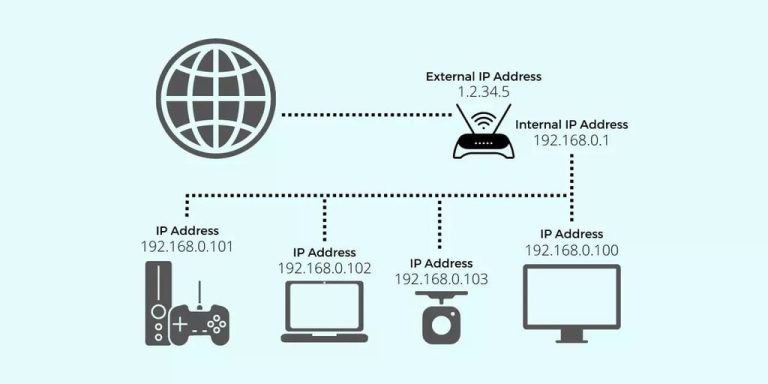
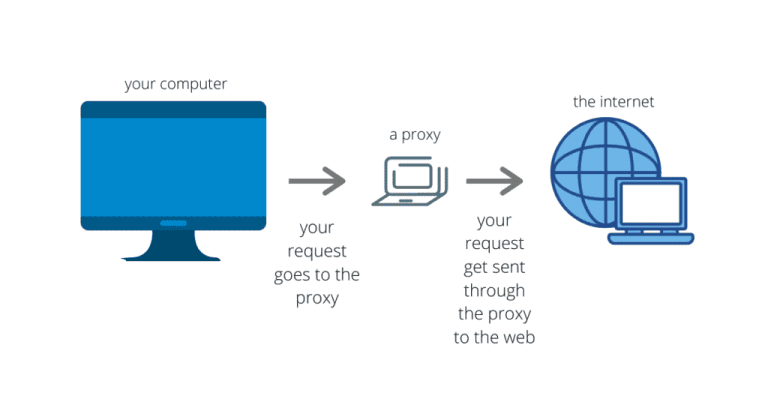
A proxy (also known as a proxy server) is an intermediary system positioned between your device and the Internet. When you access a website or an online service through a proxy, your request is first sent to the proxy server. The proxy then forwards the request to the destination server on your behalf, receives the response, and returns the data back to you.
1.2 Basic Operating Principles of a Proxy
When you connect to the Internet through a proxy, your data does not travel directly from your device to the destination server. Instead, the proxy serves as an intermediary that processes and forwards your requests.
Basic workflow:
- Sending a request: You enter a website address (for example, kienthucmo.com) in your browser.
- Proxy receives the request: The request is sent to the proxy server instead of going directly to kienthucmo.com.
- Proxy processing: The proxy may perform several actions, such as:
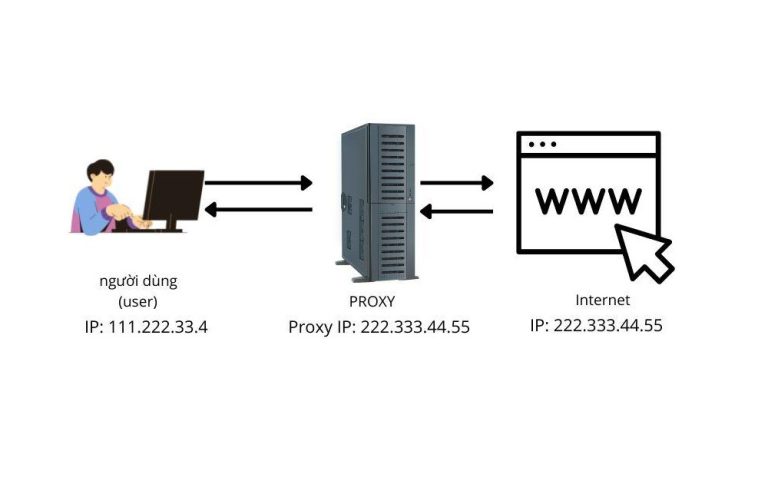
- Replacing your real IP address with the proxy’s IP address.
- Checking its cache to see if a stored version of the webpage is available.
- Applying filtering rules or security policies.
- Forwarding to the destination: The proxy sends the request to kienthucmo.com using the proxy’s IP address.
- Receiving the response: The destination server returns the data to the proxy.
- Delivering the content: The proxy forwards the response back to your device for display.
Practical example
Scenario: You are in Vietnam but want to access content available only in the United States.
How the proxy works:
- You send a request to a proxy server located in the U.S.
- The proxy uses its U.S. IP address to access the content.
- The destination server detects a U.S.-based IP and grants access.
- The proxy sends the retrieved content back to you.
Result: The website believes you are in the United States, even though you are physically located in Vietnam.
1.3 Comparison Between Direct Connections and Proxy-Based Connections
| Criteria | Direct Connection | Connection via Proxy |
|---|---|---|
| Data path | Device → Destination server | Device → Proxy → Destination server |
| Displayed IP address | Your real IP address | Proxy server’s IP address |
| Security & anonymity | Low | Higher (depending on the proxy type) |
| Filtering & access control | None | Possible to filter, block, or allow traffic based on policies |
| Access speed | Fully dependent on direct network quality | May be faster if the proxy uses caching, or slower if the proxy is far away |
2. Applications of Proxy Servers
Proxy servers are not just a dry “IT tool.” In the online world, they function like a versatile companion: they can guide you, protect your privacy, and sometimes even help you slip through the back door to access restricted content.
Bypassing restrictions and accessing geo-blocked content
When a website tells you, “This content is not available in your region,” the proxy essentially replies, “I’ve got this. I know the alternate route.”
By connecting through a proxy server located in an allowed region, you can view the content as if you were physically there.
Protecting privacy and masking your real IP
If you want to browse without being tracked, a proxy can hide your real IP address. It’s like using a face filter on TikTok while dancing—everyone can see you, but no one knows who you actually are.
Accelerating access through cached content
If the proxy has previously stored a copy of a webpage, your next visit will load almost instantly. Think of it like frequenting your favorite restaurant: the kitchen already knows your order, so your meal arrives in a flash.
Managing and monitoring internal networks
Businesses and schools use proxies to filter websites and restrict access to social media during work or class hours. In simple terms, it acts as the network’s “security guard and surveillance system,” keeping everything on the right track.
Supporting SEO, website testing, and data collection
SEO specialists use proxies to check search rankings from multiple countries, while developers rely on them to simulate traffic from various regions.
Data-scraping systems also depend on proxies to avoid getting blocked after sending a large number of repeated requests.
3. Advantages and Disadvantages of Proxy Servers
Just like any other tool, a proxy server is not perfect. Despite its many capabilities, it comes with both strengths and limitations—much like anything useful in the world of technology.
3.1 Advantages
Fast IP switching and anonymity
With just a few clicks, you can virtually “relocate” yourself to another country. This is useful when bypassing censorship or testing services across different regions.
Reduced load on origin servers
Thanks to caching, a proxy can decrease the number of direct requests sent to the original server. It works much like a restaurant where the staff prepares your usual dish in advance, so you don’t have to wait for the kitchen to start from scratch.
Network access control
In corporate environments, a proxy functions as an “IT security guard”—blocking harmful websites, allowing approved ones, and monitoring user activity across the network.
3.2 Disadvantages
No built-in data encryption
Most proxies do not automatically encrypt traffic. If someone intercepts the connection, your information could be exposed. It’s similar to sending a letter in an envelope but forgetting to seal it.
Some free proxies are unsafe
“Free” sounds appealing, but the hidden cost may be your personal data. Many free proxy services collect user information—because on the Internet, free often comes with an unexpected price.
Potentially reduced connection speed
If the proxy server is too far away or overloaded with users, your network speed may slow down, much like traffic congestion during rush hour.
4. Common Types of Proxy Servers
4.1 HTTP Proxy
Description
An HTTP proxy operates at the application layer (HTTP/HTTPS). It is commonly used by web browsers and any tools that rely on the HTTP protocol.
How it works (two primary modes)
Standard HTTP (unencrypted):
The browser sends an HTTP request to the proxy. The proxy then forwards the request to the destination server, receives the response, and returns it to the client. Because the content is not encrypted, the proxy can inspect requests and responses, apply caching, filter content, or modify headers.
HTTPS via CONNECT tunneling:
The browser sends a CONNECT host:443 command to the proxy to establish a TCP tunnel. Once the tunnel is set up, the TLS session occurs directly between the browser and the destination server, meaning the proxy cannot see the encrypted content unless SSL inspection is intentionally enabled (typically in enterprise environments where a trusted root certificate is installed on client devices).
Advantages
- Easy to configure in browsers; supports strong content filtering, access control, logging, and caching for unencrypted HTTP traffic.
- Allows defining access rules based on URL, domain, HTTP method, or header values.
Disadvantages
- With HTTPS tunneling, the proxy cannot inspect encrypted content, limiting deep filtering capabilities unless legal MITM/SSL inspection is deployed.
- Non-web applications (games, P2P tools, UDP services, etc.) generally do not work over an HTTP proxy.
- Protocols like WebSockets or gRPC may require special configurations, and not all HTTP proxies support them properly.
When to use it
- Web browsing and Internet access control in enterprises or schools.
- Optimizing bandwidth through caching of static HTTP assets (images, CSS, JS) in closed network environments.
Technical notes
- Common headers:
X-Forwarded-For,Forwarded,Via,Proxy-Authorization. - Supported authentication methods may include Basic, Digest, Bearer, and NTLM/Negotiate depending on the implementation.
- If SSL inspection is enabled, a trusted internal CA must be installed on client devices to avoid security warnings.
4.2 SOCKS Proxy (SOCKS4/4a/5)
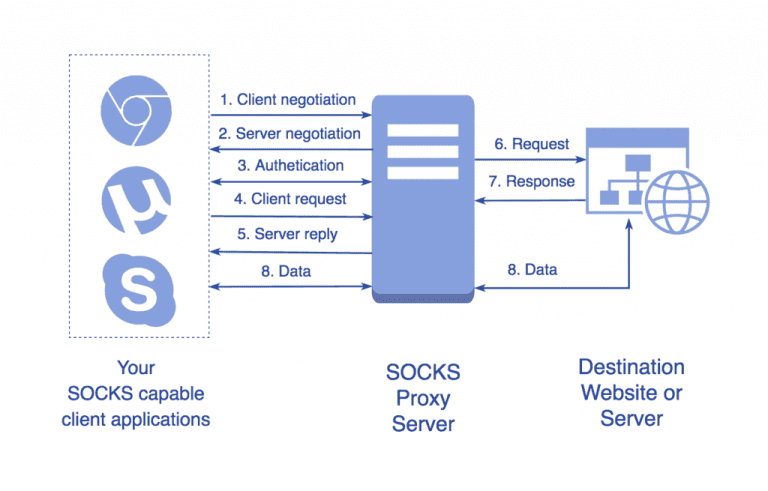
A session/transport-layer proxy operates at the TCP/UDP connection level rather than interpreting HTTP content. This makes it more flexible than an HTTP proxy.
How it works:
- The application communicates with the SOCKS proxy using the SOCKS protocol, and the proxy then opens a TCP connection (and for SOCKS5, a UDP ASSOCIATE connection) to the target host.
- SOCKS4: TCP only, no remote DNS resolution (the client must resolve DNS itself).
- SOCKS4a: TCP with support for remote DNS resolution through the proxy.
- SOCKS5: Supports TCP and UDP, offers authentication mechanisms (username/password, GSSAPI, etc.), and supports remote DNS.
Advantages:
- High flexibility: works with most TCP applications (HTTP(S), SMTP/IMAP, passive FTP, SSH, etc.) and with UDP applications via SOCKS5 (DNS, VoIP, some games).
- Independent of the application layer, making it less restrictive with various protocols.
Disadvantages:
- No content caching because the proxy does not interpret application-layer data.
- No built-in encryption; security relies on the application (e.g., HTTPS) or an external tunneling method (SSH, WireGuard, etc.).
- Requires SOCKS support from the application or operating system (commonly available but not universal).
When to use:
- When IP rotation is needed for many types of applications, not just web traffic.
- When remote DNS resolution is required to prevent DNS queries from leaking at the client side.
- In multi-protocol crawling or automation scenarios.
Technical considerations:
- Prefer SOCKS5 whenever possible (provides UDP support, authentication, and remote DNS).
- UDP support depends on infrastructure; NAT or firewalls may interfere with UDP relaying.
4.3 Transparent Proxy
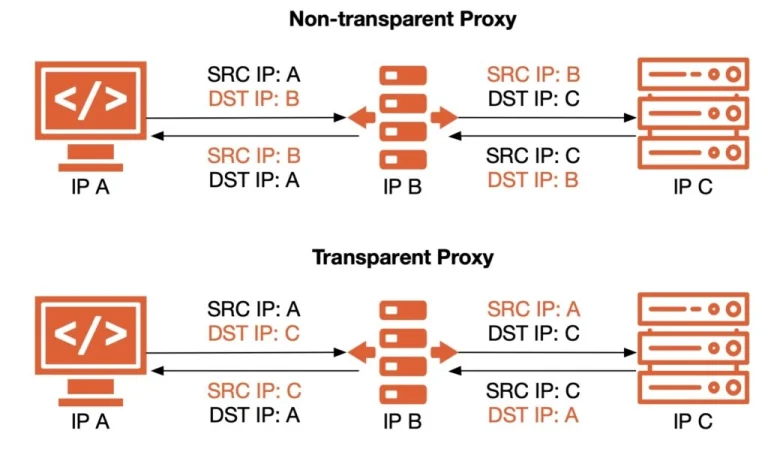
The term “transparent” is often confusing:
- In deployment terminology, “transparent” means no configuration is required on the user’s device; traffic is redirected (via NAT, WCCP, or policy routing) through the proxy.
- In HTTP anonymity terminology, “transparent” means the proxy exposes the client’s real IP in headers. These are two entirely different meanings.
Description (deployment perspective):
- End users do not configure anything; the router or firewall automatically redirects traffic to the proxy for filtering, logging, or optimization.
- Commonly used in enterprises, schools, and ISPs.
How it works:
- Uses traffic interception techniques: capturing packets and forwarding them to the proxy.
- For HTTPS, deep inspection or content filtering typically requires SSL inspection (installing an internal CA). Without it, the proxy only sees SNI or destination information, not the encrypted payload.
Advantages:
- Unified deployment across all devices without needing per-device configuration (including IoT).
- Centralized access control, logging, and policy enforcement.
Disadvantages:
- Legal and privacy risks if TLS decryption is performed without transparency and user consent.
- Some applications malfunction when exposed to interception (certificate pinning, QUIC/HTTP/3, etc.).
- Troubleshooting is more complex because traffic paths are altered.
When to use:
- Enterprises, schools, or ISPs that require centralized management, content filtering, or compliance.
- Environments that mandate access reporting or DLP (Data Loss Prevention).
Technical considerations:
- Carefully assess privacy and regulatory requirements.
- HTTP/3 (QUIC/UDP) typically bypasses traditional HTTP proxies; many environments block QUIC to force fallback to HTTP/2/TLS over TCP for control purposes.
4.4 Anonymous Proxy
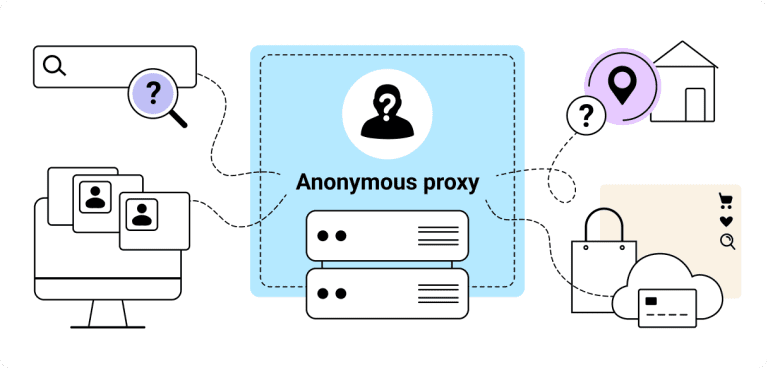
Description: Masks the user’s real IP address from the destination website, but typically reveals that a proxy is being used (through headers such as Via, Proxy-Connection, an empty X-Forwarded-For, or other detectable indicators).
How it works:
- The proxy rewrites or removes headers so the client’s IP is not forwarded to the destination server, but still leaves identifiable traces indicating that a proxy sits in the path.
Advantages:
- Provides basic IP masking, sufficient for many web-browsing, testing, and SEO scenarios.
- Easier to obtain and configure compared to “elite” (high-anonymity) proxies.
Disadvantages:
- Some websites can detect proxy usage, which may trigger restrictions or additional verification steps.
- Does not offer strong tracking resistance due to metadata leakage and fingerprinting vectors.
When to use:
- When you need to hide your IP but do not require concealing the fact that a proxy is being used.
- For testing, research, or bypassing light restrictions.
Technical considerations:
- Not “invisible” to anti-fraud systems; they rely on many additional signals (TLS fingerprinting, behavioral patterns, cookies, canvas fingerprints, etc.).
4.5 Elite Proxy / High Anonymity
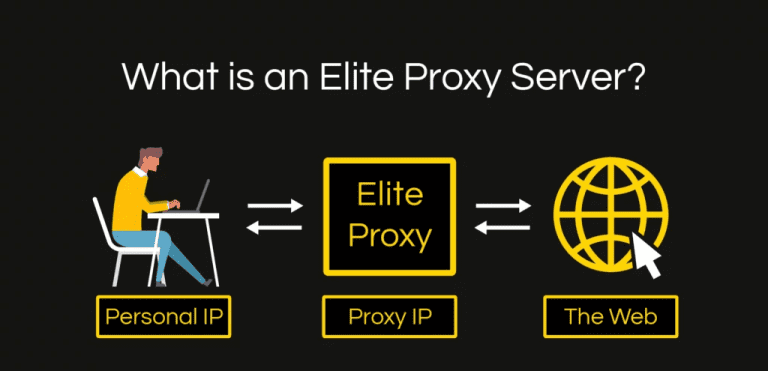
Description: Hides the user’s real IP address and does not reveal that a proxy is being used (no Via, Forwarded, X-Forwarded-For, and removes any proxy-identifying indicators).
How it works:
- Functions like a standard HTTP proxy but keeps headers minimal, prevents client-information leakage, and avoids identifying itself as a proxy.
Advantages:
- Harder to detect at the HTTP layer compared to anonymous proxies.
- Provides the strongest anonymity among HTTP proxies.
Disadvantages:
- High-quality sources are typically paid services.
- Not “invincible”: websites can still identify proxy usage through IP reputation, hosting ASN, latency patterns, and browser fingerprinting.
When to use:
- Research, testing, or automation scenarios requiring high anonymity.
- Situations where you need to avoid being classified as “using a proxy” by simple detection mechanisms.
Technical considerations:
- Pair with an anti-detect browser or a clean browser fingerprint when the target environment is strict.
- Combine SOCKS5 with proper browser configuration to minimize DNS/WebRTC leaks.
Quick Comparison Table
| Attribute | HTTP Proxy | SOCKS5 Proxy | Transparent (deployment) | Anonymous (HTTP) | Elite (HTTP) |
|---|---|---|---|---|---|
| Layer | Application | Session/Transport | Application + Network | Application | Application |
| HTTPS Support | CONNECT (tunnel) / MITM | TCP tunnel | Yes (policy-dependent) | Yes | Yes |
| UDP Support | No | Yes | Depends | No | No |
| Content Caching | Yes (HTTP) | No | Yes (when HTTP) | Possible | Possible |
| Real IP Masking | Yes | Yes | Not the primary purpose | Yes | Yes (best) |
| Detectability as Proxy | Medium | Low–Medium | Not applicable (deployment method) | Yes | Low |
| Use Beyond Web | Limited | Broad | Policy-driven | HTTP only | HTTP only |
Note: “Transparent” here refers to the interception deployment model, not anonymity level.
Common Misconceptions and Clarifications
- “SOCKS is slower than HTTP.” Not necessarily. Performance depends on proxy location, load, and network quality, not the protocol itself.
- “Using a proxy is already secure.” Proxies do not inherently encrypt traffic (except controlled MITM in corporate environments). Use HTTPS/SSH/VPN for encryption.
- “Transparent = anonymous.” In HTTP classification, a transparent proxy can even expose the client’s IP via headers. Do not confuse this with transparent deployment/interception.
5. Comparison Between Proxy and VPN
| Criteria | Proxy | VPN |
|---|---|---|
| Security | Only hides the IP address (most proxies do not encrypt traffic unless the application itself uses encryption such as HTTPS) | Hides the IP address and encrypts all traffic at the system level |
| Encryption | None (unless combined with HTTPS or when SOCKS is used inside another secure tunnel) | Yes – uses protocols such as OpenVPN, WireGuard, IKEv2, L2TP/IPSec, etc. |
| Speed | Often faster if the server is close and no encryption is involved | May be slightly slower due to encryption overhead, but stable if the VPN provider has good infrastructure |
| Scope of Application | Typically limited to the configured application/traffic (e.g., browser, SEO tool) | Applies to all Internet traffic of the device (system-wide) |
| Anonymity | Application-level anonymity, varying by type (transparent, anonymous, elite…) | Device-level anonymity with lower risk of exposing the real IP |
| Bypassing Blocks & Geo-Restrictions | Yes, but only for applications configured to use the proxy | Yes, for the entire device |
| Customization | Flexible (choose proxy type, assign by app, rotate multiple IPs) | Less customizable but easier to use; generally works as soon as you turn it on |
| Cost | Potentially cheaper (many services sell large pools of IP addresses) | Usually more expensive due to secure infrastructure and bandwidth requirements |
When Should You Choose a Proxy?
- When you need to rotate IP addresses frequently for specific applications (SEO tasks, data crawling, website testing).
- When you want to optimize speed and do not require full-traffic encryption.
- When you only need to bypass restrictions for certain applications.
- When you want to minimize costs while using multiple IPs in parallel.
When Should You Choose a VPN?
- When you require security and full encryption for all data, including on public Wi-Fi networks.
- When you need to bypass geo-restrictions across all applications on the device.
- When you want stronger anonymity and protection against IP/DNS leaks at the system level.
- When you prefer a simple “turn it on and it works” solution without configuring each application individually.
6. How to Choose the Right Proxy
Selecting a proxy is much like choosing a reliable companion on the Internet—pick the right one and everything runs smoothly; pick the wrong one and you may end up with slower performance and weaker security. Below are the key criteria to consider.
6.1. Purpose of Use
- Web browsing & bypassing restrictions:
A standard HTTP/HTTPS proxy is sufficient. Prioritize servers located near your geographic region to reduce latency. - SEO & website testing:
Use rotating proxies (IP rotation) or proxies from multiple countries to verify search results and geo-specific content. - High security & strong anonymity:
Choose Elite Proxies or SOCKS5 combined with a secure connection (SSL/TLS).
Example: If you work on international SEO → choose proxies from multiple countries. If you only need to watch U.S. Netflix → select a fast U.S.-based proxy.
6.2. Free vs. Paid
- Free proxies:
Cost-saving but often slow, unstable, and potentially risky due to data collection or tracking. - Paid proxies:
Faster, more secure, with technical support and IPs that are less likely to be blacklisted.
Note: Free services online often come with hidden costs—your personal data may be the real price.
6.3. Speed and Stability
- Test ping and bandwidth before committing to a proxy.
- Choose servers close to your current location for speed, or close to the target region if geo-unblocking is the priority.
- High-quality providers typically offer 99%+ uptime guarantees.
6.4. Required IP Location
- Select IPs from the country or region where you need to access content or execute tasks.
- Some providers offer static IPs (fixed) or dynamic IPs (periodically rotated); choose based on your needs.
Examples: Crawling data in the Japanese market → use Japanese proxies.
Testing ads for the UK market → use UK proxies.
7. Conclusion
In the digital era—where data and access speed function as critical assets—proxies operate as silent agents, enhancing your security, optimizing your online experience, and unlocking content restricted by geographic boundaries. Beyond simple IP masking or bypassing blocks, proxies support network administration, data collection, and a wide range of online strategies.
However, a proxy is not a magic solution. It has limitations, and it cannot transform a slow connection into “light-speed Internet” with a single click. To fully leverage its value, you need to understand how it works, identify the type that fits your needs, and select a reputable provider rather than relying on random free proxies floating around the Internet.
When used properly, a proxy becomes a strategic component that keeps you both secure and flexible online. But if misused… it can backfire—much like trusting a friend with a secret only to find out that this particular friend is not quite as discreet as you hoped.
8. References
[1] W. Stallings, Foundations of Modern Networking: SDN, NFV, QoE, IoT, and Cloud. Addison-Wesley Professional, 2020.
[2] IETF, “RFC 2616 – Hypertext Transfer Protocol—HTTP/1.1,” Internet Engineering Task Force.
[3] IETF, “RFC 1928 – SOCKS Protocol Version 5,” Internet Engineering Task Force.
[4] IETF, HTTP Semantics, RFC 9110, 2022.
[5] Cloudflare, “What is a Proxy Server?,” 2024. Available: https://www.cloudflare.com/learning/cdn/glossary/proxy-server/
[6] Kaspersky, “Proxy Server: What It Is & How It Works,” 2023. Available: https://www.kaspersky.com/resource-center/definitions/proxy-server