
In the current digital era, malware – also known as malicious software -has become one of the most common and complex threats facing both individuals and organizations. Malware can infiltrate computer systems, mobile devices, and even cloud platforms, thereby stealing data, disrupting operations, or causing serious financial losses.
Malware is not limited to traditional viruses but encompasses many different types with sophisticated and hard-to-detect mechanisms. Understanding what malware is, how it spreads, its common types, and effective prevention measures is a crucial step in protecting data and maintaining security in the digital environment.
In this article, I will explore each aspect of malware in depth, from basic knowledge to modern trends, in order to provide a comprehensive perspective and help us understand how to protect ourselves against threats in the digital world.
1. What Is Malware?
1.1 Basic Definition
Malware (short for malicious software) is a term used to describe software designed to infiltrate, damage, or steal data from computer systems, mobile devices, or network platforms. Unlike traditional viruses, malware is a broader concept that includes many different types such as viruses, worms, trojans, ransomware, spyware, and rootkits.
I often think of malware as a “silent intruder” within a system. It can hide itself and quietly carry out harmful activities, ranging from stealing personal information and recording user behavior to taking control of devices, all without being easily noticed by users.
1.2 The Role and Impact of Malware
Malware is not merely a nuisance but has far-reaching effects on data, privacy, and system operations:
- For individuals:
- Loss of important data such as documents, images, or videos.
- Exposure of sensitive information, including bank accounts, email accounts, passwords, and other personal data.
- Disruptions during device usage, such as slow system performance or the appearance of unusual advertisements.
- For organizations and businesses:
- System disruptions that affect business operations.
- Loss of sensitive data, customer information, business plans, or financial data.
- Financial damage and a decline in organizational reputation.
- In the modern context:
- Malware no longer exists only on personal computers (PCs) but also targets mobile devices, smart IoT devices, and cloud systems.
- The development of networking technologies, cloud computing, and smart devices has made malware prevention more complex, requiring users and organizations to increase awareness and adopt appropriate security measures.
2. Common Types of Malware
2.1 Virus
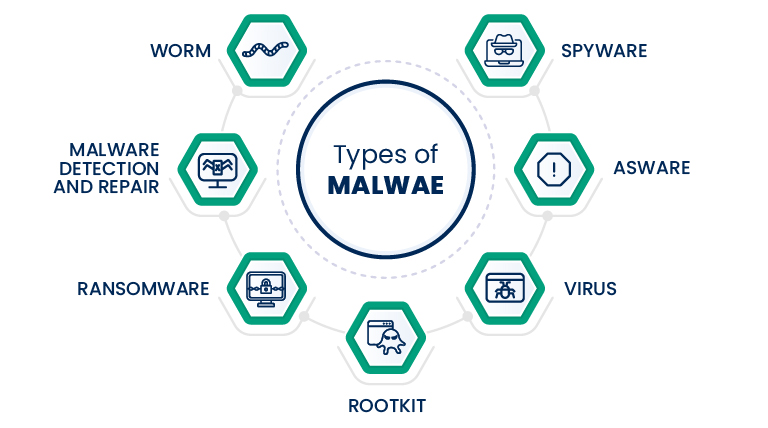
A virus is a type of malware that can replicate itself and spread through files or systems. It usually requires user interaction to be activated, such as opening an email attachment or running software from an unknown source. Viruses can cause data loss, slow down systems, or destroy important files.
2.2 Worm
Unlike viruses, worms can spread automatically across networks without the need for a host file. This allows worms to propagate rapidly, potentially attacking multiple computers at the same time, leading to network disruptions, system overloads, and data loss.
2.3 Trojan (Trojan Horse)
Trojans are disguised as legitimate software such as games, applications, or documents. Once installed by the user, the malware can steal data, capture sensitive information, or open backdoors that allow hackers to remotely control the computer. Trojans are often difficult to detect because they do not self-replicate like viruses or worms.
2.4 Ransomware
Ransomware encrypts a victim’s data and demands a ransom in exchange for decryption. This is one of the most dangerous types of malware today, particularly targeting businesses, as it can paralyze entire systems and hold critical data hostage.
2.5 Spyware and Adware
- Spyware: Monitors user behavior and collects sensitive information, such as passwords, browsing history, or personal data, without the user’s knowledge.
- Adware: Displays unwanted advertisements, sometimes accompanied by data collection for commercial purposes or targeted advertising.
2.6 Rootkit
A rootkit allows malware to hide deep within a system and take control of a device without the user being able to detect it. This is a highly sophisticated type of malware that is difficult to remove and is often combined with other forms of malware to carry out long-term attacks.
3. How Malware Spreads
Malware can infiltrate systems through many different vectors. Below is a brief summary of the most common infection paths and basic ways to recognize or prevent each of them.
- Via email, downloaded files, and malicious links
Attackers send emails containing malicious attachments or fake links (phishing). When users open the attachment or click the link, the malware is executed or downloaded onto the device.
Signs: suspicious emails, mismatched sender addresses, attachments with extensions such as .exe/.js, or compressed files that require running an internal file.
Quick prevention: do not open attachments or links from unknown sources, verify sender addresses, and use sandboxing or preview features when necessary. - Removable storage devices (USB drives, external hard drives)
Malware-infected USB devices may execute automatically (autorun) or contain malicious files. Plugging in an unfamiliar USB device can transmit malware to the system.
Signs: unfamiliar files or abnormal shortcuts appearing on the USB device.
Quick prevention: disable autorun, scan USB devices with antivirus software before opening, and use only trusted storage devices. - Software vulnerability exploitation (exploits)
Hackers exploit bugs in operating systems, browsers, or plugins to execute code remotely without user interaction. This is a common cause of rapid malware spread.
Signs: the system is compromised without obvious user actions; alerts or logs from IDS/antivirus systems.
Quick prevention: apply security patches promptly, disable unnecessary services or ports, and use WAF/IDS solutions. - Social engineering
Instead of attacking technology, attackers target people by impersonating colleagues, banks, or trusted entities, requesting money transfers or directing users to fake login pages. When users comply, they expose information or install malware.
Signs: urgent requests, alarming tone, or mismatched URLs/addresses.
Quick prevention: be skeptical of urgent requests, verify through alternative channels, and avoid entering sensitive information on unfamiliar websites. - Social networks and messaging applications
Malicious links or files are shared via platforms such as Facebook, Telegram, or Zalo. Clicking them on mobile devices or desktops can result in infection.
Signs: messages from unknown accounts or from friends with unusual or unexpected content.
Quick prevention: disable automatic file downloads, preview links before opening, and warn friends if their accounts send suspicious links (their accounts may already be compromised). - Software supply-chain attacks
Malware is embedded in updates or libraries used by many parties, spreading through trusted software.
Signs: legitimate software behaves abnormally after an update.
Quick prevention: use only official sources, verify digital signatures, and apply the principle of least privilege.
In summary: many malware infections succeed because users click on malicious links or download infected files, or because systems have not been properly patched. I strongly recommend combining user awareness, regular software updates, and security solutions (antivirus, firewall, and backups) to significantly reduce risk.
4. Malware Deployment and Impact
Malware manifests and causes damage differently depending on the platform. Understanding the weaknesses and attack patterns specific to each platform helps us choose appropriate defensive measures.
| Platform | Common Malware | Impact | Prevention Methods |
|---|---|---|---|
| Windows | Virus, Trojan, Ransomware | Data loss, system disruption, financial damage | Update the OS and software, use antivirus solutions, perform regular backups, disable unnecessary services |
| macOS | Trojan, Adware | Loss of control, data leakage, system slowdown | Install software only from trusted sources, keep the operating system updated, use antivirus/macOS security features |
| Android | Trojan, Spyware, Adware | Personal data leakage, battery drain, device takeover | Install apps from the Play Store, review app permissions, update the OS, avoid clicking suspicious links |
| iOS | Spyware, Trojan | Loss of privacy, exposure of sensitive data | Keep iOS updated, do not jailbreak devices, install apps only from the App Store, review app permissions |
| IoT devices | Botnet malware | Device takeover, DDoS attacks, spread to other systems | Change default passwords, update firmware, segment networks, enable logging and monitoring |
| Cloud | Ransomware, supply-chain malware | Centralized data theft, service disruption, large-scale risk | Enforce access control, use MFA, apply patches promptly, monitor for anomalies, choose reputable service providers |
Each platform has its own attack characteristics and risk levels. PCs and macOS systems are often targeted for personal data theft and system control; mobile platforms mainly face threats related to privacy invasion and behavioral tracking; IoT and cloud environments are prime targets for large-scale attacks such as botnets, ransomware, and supply-chain attacks.
Effective malware prevention requires a combination of technical measures and increased user awareness, ranging from regular software updates and the use of security tools to safe habits in device and network usage.
5. How to Prevent Malware
Effective malware prevention does not rely solely on technical tools but also depends on users’ security awareness and habits. Some important measures include:
- Regularly updating operating systems and software:
Updates often contain security patches. Computers or mobile devices that are not updated are more likely to become targets of attacks. - Using antivirus software and firewalls:
Antivirus software helps detect and block malware in a timely manner, while firewalls monitor network traffic and block suspicious connections. - Being cautious with emails, links, and downloaded files:
Do not open attachments or click links from unknown or untrusted sources. Email phishing is one of the most common ways malware infiltrates systems. - Regular data backups:
Backing up data helps minimize damage if a device is attacked by ransomware or viruses. Backups should be stored outside the primary device. - Understanding phishing and social engineering:
Recognizing scam tactics, such as fake emails, websites, or messages, helps avoid being tricked into entering personal information or installing malware.
You should maintain the habit of checking and staying cautious with unfamiliar links, files, and applications in order to minimize the risk of malware infiltrating personal computers and mobile devices.
6. Modern Malware Trends
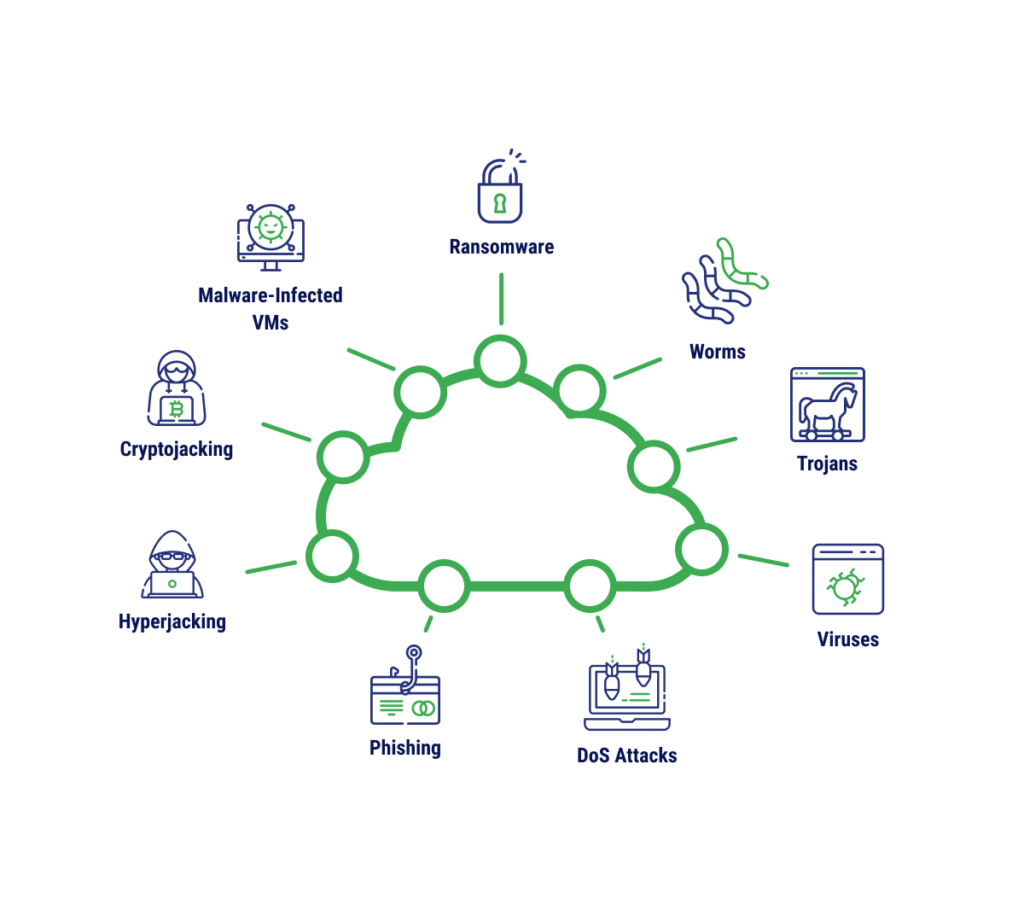
Today’s malware no longer targets only personal computers; it has evolved to become more complex and diverse, attacking multiple platforms and exploiting new technologies:
- Cloud and SaaS attacks: Malware targets online stored data by exploiting configuration vulnerabilities, taking over administrative privileges, or stealing information from cloud-based applications.
- Rapid growth of mobile malware: With the increasing number of mobile devices, malware on Android and iOS is growing quickly – from trojans and spyware to mobile ransomware – posing serious threats to privacy and personal data.
- AI-powered malware: Malware leverages artificial intelligence to make attacks more sophisticated, from target selection and evasion of defense systems to generating highly convincing phishing content.
- Malware hidden in IoT devices: Smart devices such as cameras, routers, and sensors are easily exploited to form botnets, launch large-scale attacks like DDoS, or act as gateways to infiltrate other systems.
- Modern defense methods: To counter advanced malware, organizations adopt Threat Intelligence, behavior analysis, and Machine Learning to detect anomalies and stop malware before it causes damage.
Overall, malware is becoming increasingly sophisticated and cross-platform, requiring users and orga
7. Conclusion
Malware has become an unavoidable part of the digital world, affecting everything from personal computers and mobile phones to IoT devices and cloud systems. Understanding what malware is, its common types, how it spreads, and its impact on different platforms is the first step toward protecting our data and systems.
Effective malware prevention requires a combination of knowledge, secure habits, and technical tools such as regular software updates, antivirus solutions, periodic backups, and the ability to recognize phishing and social engineering tactics. At the same time, given modern malware trends, adopting technologies such as behavior monitoring, artificial intelligence, and threat intelligence can help detect and stop threats at an early stage.
Overall, awareness, safe practices, and technical solutions are the keys to minimizing risks and maintaining security in an increasingly complex digital environment. Proactive protection not only safeguards individuals but also contributes to protecting the broader online community and shared information systems.
8. References
[1] P. Szor, The Art of Computer Virus Research and Defense, 2nd ed. Boston, MA: Addison-Wesley, 2005.[2] M. Howard and D. LeBlanc, Writing Secure Code, 2nd ed. Redmond, WA: Microsoft Press, 2003.[3] Symantec, “What is Malware? Types of Malware Explained,” 2023. [Online]. Available: https://www.symantec.com/blogs/threat-intelligence/what-is-malware. [Accessed: Oct. 6, 2025].[4] Kaspersky, “Malware types and how to protect yourself,” 2024. [Online]. Available: https://www.kaspersky.com/resource-center/threats/malware. [Accessed: Oct. 6, 2025].[5] M. E. Whitman and H. J. Mattord, Principles of Information Security, 7th ed. Boston, MA: Cengage, 2021.